

When you're managing 30, 50, or 80 active cases, keeping track of client information stops being a nice-to-have and becomes the thing that determines whether important details fall through the cracks. Missed follow-ups, lost referral information, and duplicated efforts aren't just inefficiencies — they're gaps in care that affect real people.
Most social workers know they need a better system. The challenge is building one that's realistic for how you actually work — not how a training manual says you should. This guide covers practical strategies for organizing client records, making information findable, and choosing tools that support rather than complicate your workflow.
The simplest reason is the one you've heard before: if it isn't documented, it didn't happen. But beyond the compliance obligation, organized client records serve your practice in ways that aren't always obvious until something goes wrong.
When a colleague covers your caseload while you're out sick, can they find what they need? When a supervisor asks about a client's referral history during case consultation, how long does it take you to pull that up? When a funder audits your program, are your records complete enough to demonstrate the services you provided?
Disorganized information creates stress — the nagging feeling that you're forgetting something, the scramble before supervision, the hours spent reconstructing what happened during a home visit two weeks ago. A consistent system reduces that cognitive load and lets you focus on the work that matters. For a broader look at organizing your practice, see our case management best practices guide.
The single most impactful thing you can do is standardize your client record structure. When every case follows the same format, you always know where to look for information — and so does anyone else who needs to access the record.
A solid client record typically includes these core sections, though you should adapt them to your setting and population.
Identifying information covers the basics: name, date of birth, contact information, emergency contacts, and any relevant identifiers your agency requires.
Presenting problem and referral information captures why the client is receiving services, who referred them, and the initial context of their case.
Assessment notes include your initial assessments — intake summaries, biopsychosocial assessments, risk assessments, and any standardized screening tools you've administered.
Service plan documents goals, objectives, planned interventions, and timelines. This is the roadmap for the case.
Progress notes are the chronological record of each interaction — sessions, phone calls, home visits, coordination with other providers. This is usually the largest section and the one you add to most frequently.
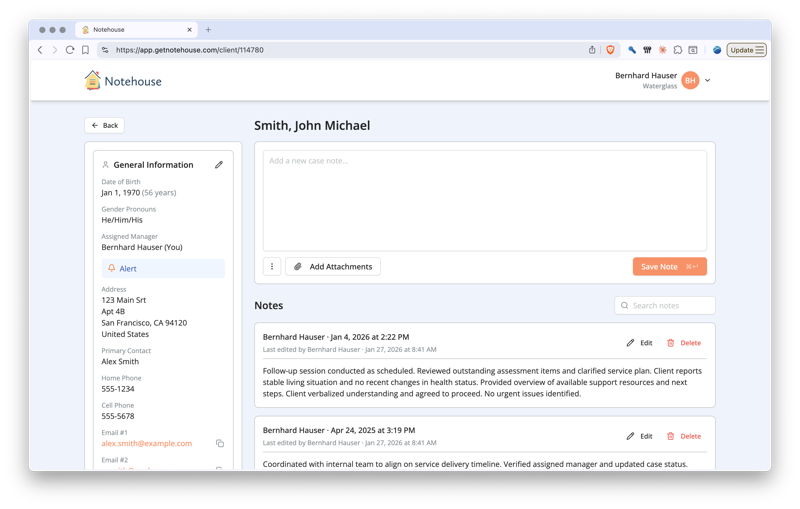 Progress notes create a chronological record of every interaction — sessions, calls, home visits, and provider coordination.
Key dates and deadlines track court dates, review dates, benefit renewals, referral follow-ups, and any other time-sensitive items.
Contacts and collaterals list other providers, family members, and systems involved in the client's care, along with contact information and release-of-information status.
The specific sections matter less than the consistency. Once you have a structure, use it for every client. Our guide to building an efficient note-taking system goes deeper into how to design a structure that works for your specific practice.
A well-organized folder structure gets you partway there, but tags and labels are what make information truly findable across your entire caseload.
Think about the questions you need to answer regularly: Which clients are waiting for housing referrals? Who has an upcoming court date? Which cases involve substance use concerns? If your system only lets you browse client-by-client, answering these questions means opening every file individually.
Tags let you cross-reference information across cases. You might tag notes with categories like "housing," "referral-pending," "crisis," "court-involved," or "benefits-review." When you need to pull up every client with a pending referral, a single search gets you there.
This is especially valuable during supervision, when you're reviewing your full caseload and need to identify priorities quickly. It also helps during transitions — when you're handing off cases or a new worker is taking over, tagged records give them an instant overview of what's active and what needs attention.
Most purpose-built case management tools include tagging functionality. If you're currently using spreadsheets or documents, you can approximate this with consistent naming conventions or color coding, but it requires more discipline to maintain. For different approaches to structuring your documentation, see our guide to note-taking methods for human services.
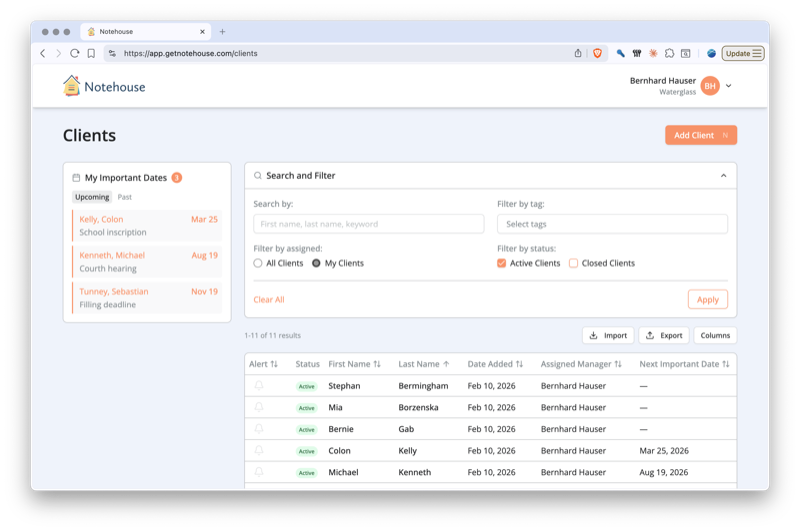 Tags and filters let you cross-reference information across your entire caseload in seconds.
The gap between an interaction and the documentation of that interaction is where details get lost. The longer you wait, the less accurate your notes become — and in social work, accuracy matters. Specific quotes, behavioral observations, and contextual details that seem memorable in the moment fade quickly when you're carrying a full caseload.
Several strategies can help close that gap.
Take brief notes during sessions when appropriate. Not every setting allows this, but when it does, even a few key words or phrases can anchor your memory when you write the full note later. A notebook, a tablet, or even your phone's notes app can work.
Use the last 5-10 minutes of your session slot for documentation. If you schedule clients every hour, use the last portion for notes rather than back-to-back sessions. This small buffer makes a significant difference in documentation quality.
Try speech-to-text for post-session notes. Walking back to your car after a home visit? Dictate your key observations into your phone. You can clean up the transcription later, but the raw content captures details you'd otherwise forget.
Block documentation time on your calendar. If real-time documentation isn't possible, schedule a protected block — even 30 minutes at the end of each day — specifically for catching up on notes. Treating it like an appointment makes it harder to skip.
 Closing the gap between an interaction and its documentation is where the most important details are preserved.
For more strategies on capturing information efficiently, see our guide to client meeting note-taking.
Client information in social work is some of the most sensitive data in any professional setting. Case notes may contain details about abuse, mental health crises, substance use, immigration status, HIV status, and other information that could cause serious harm if disclosed inappropriately.
Use HIPAA-compliant tools if you're in a setting where HIPAA applies (and even if it doesn't, the standards are a good baseline). This means encrypted storage, secure login, and a provider that will sign a Business Associate Agreement.
Avoid personal email, text messages, and consumer cloud storage for client information. It's tempting to email yourself a note or text a colleague about a case, but these channels don't meet professional security standards and create records you can't control.
Set up role-based access so team members only see what they need to see. An intern doesn't need access to every client's full history. A supervisor might need read access but not editing rights. Granular permissions protect clients and reduce risk.
Maintain regular backups and understand your agency's data retention policies. Know how long records need to be kept after case closure and how they should be destroyed when the time comes.
For a detailed look at security requirements in case management tools, see our guide to case management software must-haves.
The spectrum of available tools ranges from completely free to enterprise-level platforms, and the right choice depends on your caseload size, budget, setting, and compliance requirements.
Paper files still work for very small caseloads in settings where digital tools aren't required. The limitations are obvious — no searchability, no backups, no remote access — but some practitioners prefer the simplicity.
Spreadsheets (Excel, Google Sheets) add searchability and basic organization. You can create a client tracking sheet, filter by status or service type, and share with colleagues. The downside is that spreadsheets weren't designed for case documentation, and they become unwieldy as your caseload grows.
Google Docs and Drive give you document-based records with version history, shared access, and folder organization. It's a step up from spreadsheets for narrative documentation, though it lacks purpose-built features like tagging, client profiles, and reporting. If you're currently using Google Docs and wondering what's next, our Google Docs alternative guide explores the transition.
| Tool | Cost | Searchable | Secure | HIPAA Compliant | Collaboration |
|---|---|---|---|---|---|
| Paper files | Free | No | Physical lock only | No | Difficult |
| Spreadsheets | Free-low | Basic | Depends on storage | No | Limited |
| Google Docs + Drive | Free-low | Moderate | Moderate | Not by default | Good |
| Purpose-built software | $12+/mo | Yes | Yes | Varies by vendor | Built-in |
Purpose-built case management software is designed specifically for this work. Client profiles, chronological case notes, tagging, search, team collaboration, reporting, and security features — all in one place. For a detailed comparison of the best options available, see our ranked guide to the best social work case management software. If budget is your primary concern, our guide to free and low-cost case management solutions focuses specifically on affordable options.
Wherever you are on this spectrum, the principles are the same: be consistent, be thorough, and be secure. The tool should reduce friction, not add it.
If you're ready to try a purpose-built platform, Notehouse was created specifically for social workers who need organized, searchable, HIPAA-compliant client records without the complexity of enterprise software. See how Notehouse helps social workers stay organized, or start a free trial to see if it fits the way you work.
Note: Documentation and data-privacy requirements vary by country, state, setting, and role. Before choosing a tool, review your local regulations, licensing rules, and agency or funder requirements.


Notehouse is a simple, yet powerful case management solution for teams. Get started with a free trial, no credit card required.
Explore Notehouse ›Powerfully Simple Case Management You'll Actually Use

4.7 stars from 101 customers reviews
Case Management Software for nonprofit leaders, counselors, managers, and social workers.
© 2026 Waterglass UK Ltd.


Free Tools